

Website accessibility is often treated as something to check after a website has been designed and developed. Teams launch the site, run an accessibility audit, discover issues, and then begin fixing them.
A better approach is to consider accessibility before website development begins.
When accessibility is included during planning, design, content creation, and development, organizations can build digital experiences that are easier for everyone to use while reducing the need for extensive remediation later.
What Does Accessibility-First Website Development Mean?
Accessibility-first development means considering the needs of people with disabilities throughout the website development lifecycle rather than adding accessibility as a final checklist item.
This includes thinking about users who may navigate websites using:
- Screen readers
- Keyboard navigation
- Voice controls
- Screen magnification
- Alternative input devices
- High-contrast or customized display settings
Accessibility considerations should therefore influence everything from page structure and navigation to colors, forms, images, videos, and interactive components.
Why Waiting Until After Development Creates Problems
Imagine completing an entire building and only afterward discovering that entrances, elevators, and signs are difficult for some visitors to use.
Digital accessibility can face a similar problem.
When accessibility testing happens only after development, teams may discover issues involving navigation, page structure, components, forms, content, and visual design.
Fixing these problems may require developers and designers to revisit work they have already completed.
By identifying accessibility requirements earlier, teams can prevent many of these issues from becoming part of the website in the first place.
1. Accessibility Can Influence Website Architecture
Accessibility begins with how information and functionality are organized.
Before development starts, teams should consider:
- Clear and consistent navigation
- Logical page hierarchy
- Meaningful heading structures
- Keyboard-friendly interactions
- Accessible forms and error handling
- Descriptive links and buttons
- Consistent page layouts
When these principles are incorporated into wireframes and technical requirements, developers have a clearer foundation for building accessible pages.
2. Accessible Design Decisions Should Happen Early
Many accessibility problems originate during the design stage.
For example, designers may select colors that do not provide sufficient contrast or create interfaces where important information is communicated only through color.
Design teams should consider accessibility when choosing:
- Text and background colors
- Font sizes
- Button sizes
- Form layouts
- Focus states
- Navigation patterns
- Interactive components
- Responsive layouts
Addressing these elements before development is generally much easier than redesigning components after implementation.
3. Content Also Needs Accessibility Planning
Accessibility isn’t limited to code.
Website content plays an equally important role in creating an inclusive digital experience.
Content teams should plan for meaningful image alternative text, descriptive link text, clear headings, understandable instructions, accessible documents, and captions or transcripts where appropriate.
For example, instead of using a vague link such as “Click Here,” descriptive text can help users understand where the link will take them.
When accessibility becomes part of the content workflow, accessible publishing becomes a routine process rather than a later correction.
4. Developers Can Build Accessible Components From the Beginning
Modern websites frequently reuse components such as navigation menus, buttons, accordions, tabs, forms, pop-ups, and carousels.
If a reusable component contains an accessibility problem, that issue can appear across many pages.
Developers should therefore establish accessibility requirements for shared components before they are deployed throughout the website.
Important considerations can include:
- Semantic HTML
- Keyboard accessibility
- Visible focus indicators
- Appropriate labels
- Accessible form validation
- Correct use of ARIA
- Screen-reader compatibility
- Logical focus order
Building accessible components early can prevent the same issue from being duplicated throughout the site.
By the numbers: According to the 2026 WebAIM Million report, which evaluates the accessibility of the top one million home pages on the web, 95.9% of home pages had detectable WCAG 2 failures, and the average page now carries 56.1 distinct accessibility errors. Put another way, users with disabilities can expect to hit a barrier on roughly 1 in every 26 elements they interact with — a scale of failure that reflects how much accessibility is still being addressed too late to be effective.
5. Early Accessibility Can Reduce Remediation Work
Accessibility remediation can become complicated when issues are deeply embedded within templates, components, or design systems.
For example, changing a single inaccessible button is relatively simple.
Changing an inaccessible button component that has already been implemented across hundreds of pages can require significantly more work.
An accessibility-first workflow helps teams identify potential problems while changes are still easier to make.
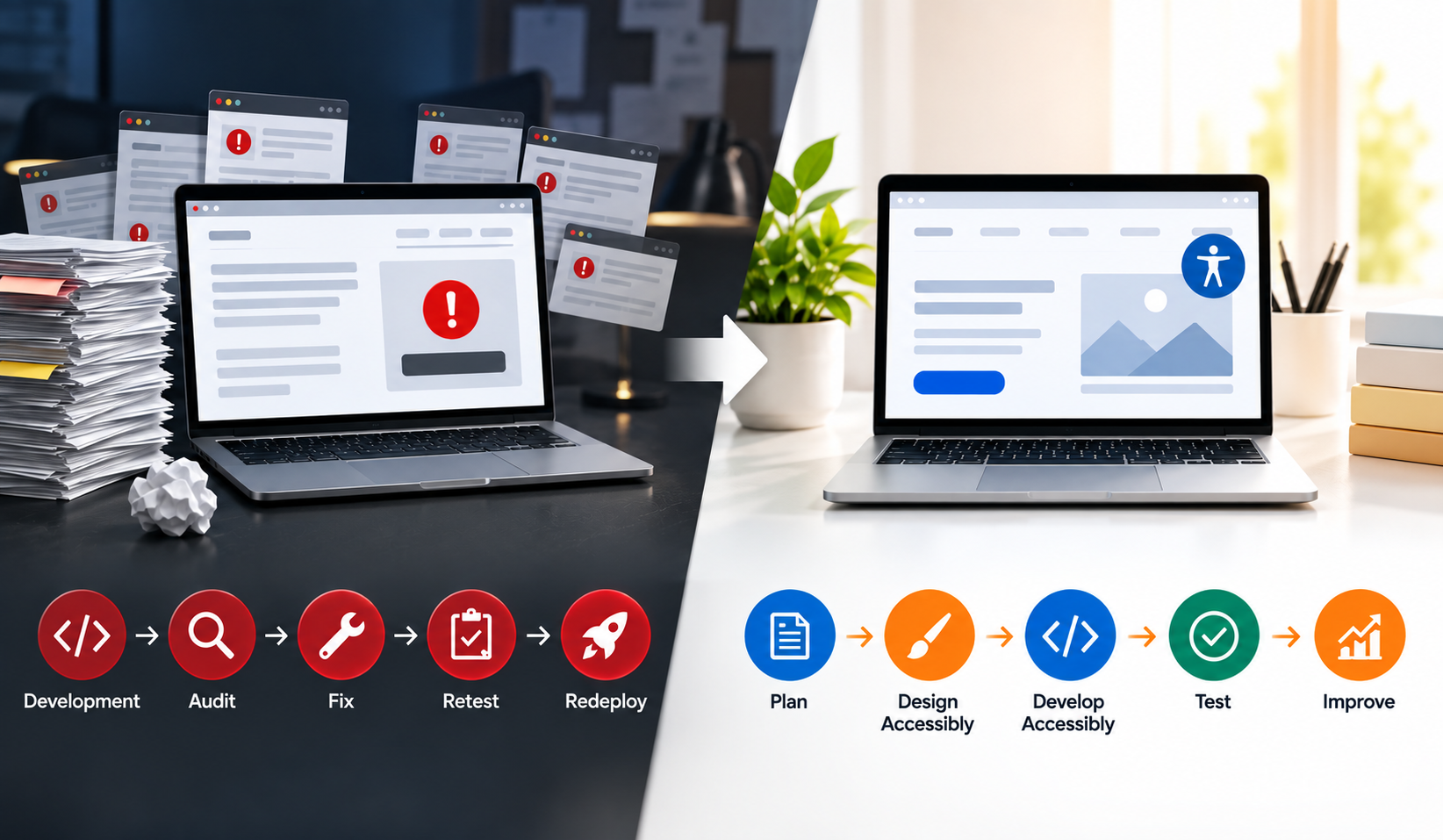
Accessibility testing is still important, but it becomes part of quality assurance rather than primarily a process for discovering avoidable problems after launch.
6. Accessibility Supports a Better User Experience
Many accessibility practices can also improve usability more broadly.
Clear navigation helps visitors find information faster. Good contrast improves readability. Descriptive labels make forms easier to understand. Keyboard-friendly interfaces provide additional ways to navigate. Captions can help people consume videos without audio.
As a result, accessibility should not be viewed only as a compliance requirement.
It is also an important part of creating websites that are clear, understandable, and easier to interact with.
7. Accessibility Standards Can Become Part of the Development Process
Organizations can incorporate accessibility requirements into their existing workflows.
For example:
Planning: Define accessibility requirements and applicable standards.
UX: Create logical navigation and user journeys.
Design: Review contrast, typography, focus states, and components.
Content: Prepare accessible text, images, multimedia, and documents.
Development: Use semantic markup and accessible interaction patterns.
QA: Perform automated and manual accessibility testing.
Post-Launch: Continue monitoring the website as content and functionality change.
This approach makes accessibility a shared responsibility across the project rather than something assigned only to developers or QA teams.
Where WCAG Fits Into the Process
The Web Content Accessibility Guidelines (WCAG) provide internationally recognized guidance for improving digital accessibility.
WCAG is organized around four core principles:
Perceivable: Users should be able to perceive website information.
Operable: Users should be able to navigate and interact with the interface.
Understandable: Information and functionality should be understandable.
Robust: Content should work reliably with different browsers and assistive technologies.
Using relevant WCAG requirements during planning and development gives teams clearer accessibility criteria before a website reaches production. Organizations that need structured support meeting these standards can also work with a partner offering dedicated accessibility compliance services to guide WCAG, ADA, and Section 508 alignment from the start.
Accessibility Doesn’t End at Launch
Starting accessibility early does not mean testing stops once the website launches.
Websites constantly change.
New landing pages are created, content is updated, plugins are installed, forms are modified, and new features are introduced. Each change can potentially introduce accessibility issues.
Organizations therefore need both accessible development practices and continuous accessibility monitoring to catch problems as a site evolves, not just at launch.
Build Accessibility Into the Website, Not Onto It
The best time to think about accessibility isn’t after a website has already been developed.
It is when the website is being planned.
Making accessibility part of requirements, UX, design, content, development, and QA can help organizations create more inclusive digital experiences while reducing unnecessary remediation work.
Instead of asking:
“How do we make this website accessible after development?”
Teams can start with a better question:
“How do we build accessibility into this website from day one?”
That shift can make accessibility a natural part of website quality rather than a problem that needs to be resolved later.
This approach is where eGrove Systems builds accessibility into the process rather than treating it as a final pass across the web and e-commerce projects our teams plan, design, and develop for clients. For ongoing monitoring once a site is live, tools like Elite Site Optimizer can help track and flag accessibility issues as content and pages change, supporting the same accessibility-first approach after launch.
If you’re planning a new website or redesign, the earlier accessibility enters the process, the less it costs to get right. Contact eGrove Systems to plan your next project with accessibility built in from the start.