
A modern website is no longer just a digital presence; it is a complex platform that directly impacts search visibility, user engagement, conversion rates, and business performance. A successful website redesign requires more than visual improvements,it involves optimizing technical architecture, code quality, content structure, Core Web Vitals, security, accessibility, and user experience frameworks.
Many businesses redesign their websites only after noticing declining traffic or outdated visuals. However, waiting until problems become severe often results in lost leads and revenue. A well-planned website redesign proactively addresses technical SEO, performance, security, mobile usability, accessibility, and evolving customer expectations.
Modern users expect websites to deliver fast loading speeds, seamless interactions, intuitive navigation, and consistent experiences across devices and browsers. At the same time, search engines evaluate technical factors such as page experience signals, structured data implementation, mobile usability, content relevance, and website accessibility when determining rankings.
Website redesigning is the process of updating, restructuring, and improving an existing website to enhance its design, performance, functionality, user experience, and search engine visibility. It goes beyond changing the visual appearance and focuses on improving the website’s technical foundation, content structure, speed, security, accessibility, and ability to generate business results.
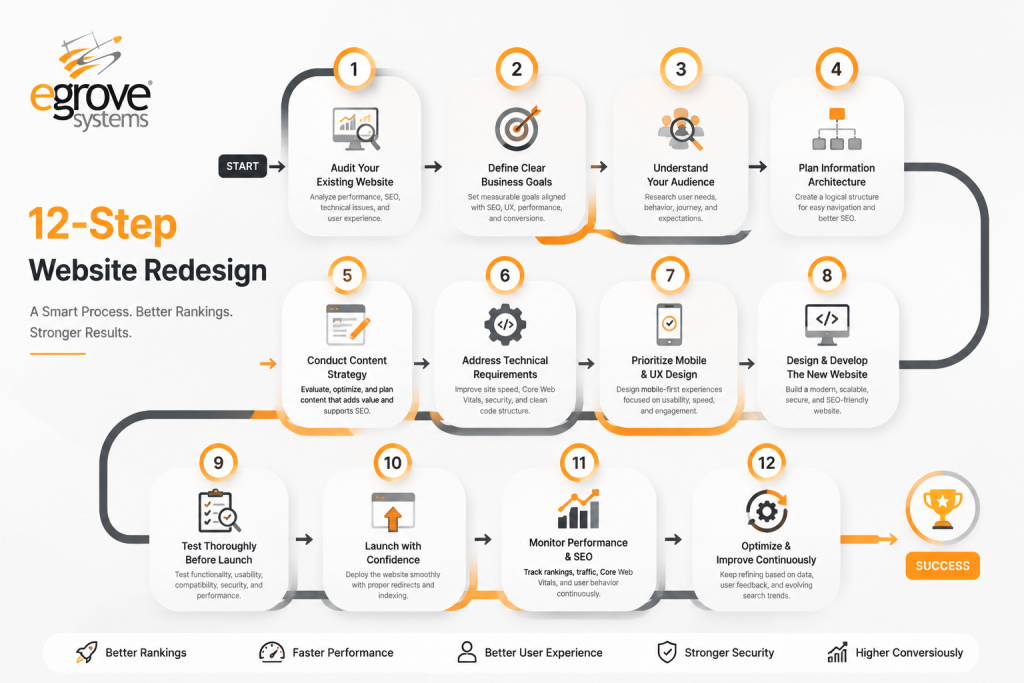
In this guide, we’ll walk through a practical 12-step website redesign process that helps improve rankings, performance, and user experience while protecting your existing SEO value.
Why Website Redesign Matters in 2026
Website redesign isn’t simply about aesthetics. It directly affects:
- Organic search rankings
- User engagement
- Conversion rates
- Website speed
- Mobile experience
- Accessibility compliance
- Brand credibility
- Lead generation
A redesign also provides an opportunity to modernize your technology stack, improve security, simplify content management, and prepare your website for AI-driven search experiences.
Step 1: Audit Your Existing Website
Before redesigning anything, understand what currently works.
Conduct a comprehensive website audit that evaluates:
- Organic Traffic: Analyze current search traffic trends, traffic sources, and pages attracting the most visitors.
- Top-Performing Pages: Identify high-value pages that generate traffic, engagement, leads, or conversions.
- Keyword Rankings: Review existing keyword positions and identify ranking opportunities and potential losses.
- Backlinks: Evaluate the quality and authority of websites linking to your domain and identify link-building opportunities.
- Core Web Vitals: Measure website speed, loading performance, responsiveness, and user experience factors.
- Crawl Errors: Detect indexing issues, broken pages, and technical problems affecting search engine visibility.
- Broken Links: Find and fix internal and external broken links that impact user experience and SEO performance.
- Conversion Rates: Analyze forms, CTAs, landing pages, and user journeys to understand conversion performance.
- Mobile Usability: Check how effectively your website performs across smartphones and mobile devices.
- Accessibility Issues: Identify usability barriers and compliance gaps affecting users with different abilities.
This prevents accidentally removing pages that generate valuable traffic.
Helpful tools include:
-
- Google Analytics
- Google Search Console
- Lighthouse
- Screaming Frog
A thorough audit creates a roadmap for your redesign instead of relying on assumptions.
Step 2: Define Clear Business Goals
Every redesign should solve business problems, not just visual ones.
Examples include:
- Increase organic traffic by 40% by improving SEO structure, content quality, technical performance, and search engine visibility to attract more qualified visitors.
- Improve lead generation by optimizing user journeys, strengthening calls-to-action, improving landing pages, and making it easier for visitors to convert.
- Reduce bounce rate by creating a better user experience, faster page loading, relevant content, and intuitive navigation that keeps visitors engaged.
- Increase ecommerce conversions by simplifying the buying process, improving product discovery, optimizing checkout experiences, and building customer trust.
- Improve mobile engagement by delivering a responsive, fast, and user-friendly mobile experience that encourages visitors to interact and take action.
- Prepare for AI search visibility by optimizing content structure, schema markup, brand signals, and information accessibility for AI-powered search platforms.
- Meet WCAG accessibility standards by ensuring the website is inclusive, easy to use, and accessible for users with different abilities and needs.
- Track measurable business outcomes by defining clear redesign goals, monitoring performance metrics, and ensuring every design decision supports business growth.
Having measurable goals keeps the redesign focused.
Step 3: Understand Your Audience
User expectations continuously evolve.
Analyze:
- Visitor demographics – Understand your target customers’ age, location, interests, and buying patterns to create experiences that match their needs.
- Device usage – Identify whether visitors access your platform through mobile, desktop, or tablets to ensure a seamless experience across all devices.
- Customer journey – Map the complete path customers take from discovering your business to completing a purchase, booking, or interaction.
- Pain points – Identify challenges, confusion, or barriers that prevent customers from completing desired actions.
- Frequently visited pages – Analyze the pages customers engage with most to understand their interests and optimize important content.
- Exit pages – Determine where visitors leave your website or app to identify potential usability issues or missing information.
- Search behavior – Understand what customers search for, the keywords they use, and the information they expect to find.
Use heatmaps, session recordings, surveys, and analytics to identify friction points.
Design decisions should always be based on user behavior not personal preference.
Step 4: Improve Website Architecture
Site architecture significantly influences SEO and usability.
Create a logical navigation structure by:
- Organizing content into clear categories – Structure your website content into logical categories and sections so users and search engines can easily understand the relationship between pages.
- Reducing unnecessary clicks – Minimize the number of steps required to access important information by creating a simple and efficient navigation flow.
- Using descriptive URLs – Create clean, keyword-relevant URLs that clearly indicate the page topic and improve search engine understanding.
- Simplifying menus – Design intuitive menus with fewer distractions, helping visitors quickly find the information they need.
- Improving internal linking – Connect related pages through strategic internal links to improve navigation, distribute page authority, and help search engines discover content.
Visitors should reach important pages within three clicks whenever possible.
Search engines also crawl well-structured websites more efficiently.
Step 5: Preserve Your SEO Value
One of the biggest redesign mistakes is losing existing search rankings.
Protect SEO by:
- Keeping important URLs whenever possible – Retain high-performing pages and existing URL structures to avoid losing valuable search authority and backlinks.
- Mapping old URLs to new URLs – Create a clear URL migration plan to ensure every important old page has a relevant replacement.
- Creating proper 301 redirects – Redirect outdated URLs permanently to their new locations so search engines and users are guided correctly.
- Preserving title tags – Maintain optimized page titles or improve them carefully to protect existing keyword rankings.
- Retaining optimized content – Keep valuable, search-optimized content while improving readability, relevance, and user experience.
- Maintaining structured data – Preserve schema markup and structured data elements to help search engines understand your website content.
- Monitoring indexing after launch – Track crawl errors, indexing status, rankings, and search performance after the redesign goes live.
A redesign should strengthen SEO not reset it.
Step 6: Design for Mobile First
Mobile devices now account for the majority of web traffic across many industries, making mobile-first design essential.
Key considerations include:
- Responsive layouts: Create flexible website designs that automatically adapt to different screen sizes and devices for consistent user experience.
- Touch-friendly buttons: Ensure buttons, menus, and interactive elements are large enough and easy to use on mobile screens.
- Readable typography: Use clear fonts, proper sizing, and spacing to make content easy to read without zooming.
- Fast loading images: Optimize images through compression and proper formats to improve mobile speed and reduce loading time.
- Optimized forms: Design simple, short, and mobile-friendly forms that minimize user effort and increase conversions.
- Simplified navigation: Provide easy-to-use menus and clear navigation paths so users can quickly find required information.
Google primarily indexes the mobile version of websites, making mobile optimization critical for rankings.
Step 7: Improve Website Performance
Speed directly impacts:
- User Experience: Faster websites create smoother browsing experiences, keeping visitors engaged and encouraging them to explore more pages.
- Bounce Rate: Slow-loading websites often frustrate users, causing them to leave quickly and increasing bounce rates.
- SEO Rankings: Search engines like Google consider website performance and loading speed as important ranking factors.
- Conversion Rate: Improved website speed helps visitors complete desired actions faster, leading to higher sales, inquiries, and sign-ups.
Performance improvements include:
- Image optimization
- Lazy loading
- Code minification
- Browser caching
- CDN implementation
- Modern image formats
- Reduced JavaScript
- Optimized fonts
Every second saved improves both user satisfaction and search visibility.
Step 8: Prioritize Accessibility
An accessible website benefits every visitor while expanding your audience.
Accessibility improvements include:
- Proper heading hierarchy – Organize content with clear H1, H2, and H3 structures to improve readability and help screen readers understand page content.
- Keyboard navigation – Ensure users can access and interact with all website features without relying on a mouse or touch input.
- Alternative image text – Add descriptive alt text to images so visually impaired users can understand visual content through screen readers.
- Sufficient color contrast – Use accessible color combinations to ensure text and important elements remain readable for all users.
- Screen reader compatibility – Optimize website structure and elements so assistive technologies can accurately interpret and present content.
- Accessible forms – Design forms with clear labels, instructions, error messages, and proper field structures for easier completion.
- Focus indicators – Provide visible indicators showing which element is currently selected during keyboard navigation.
- Captioned multimedia – Include captions, transcripts, and accessible controls for videos and audio content to support users with hearing impairments.
Accessibility also supports SEO by improving website structure and content clarity.
Businesses increasingly prioritize WCAG compliance to improve inclusivity while reducing legal risks.
Step 9: Refresh Your Content Strategy
A redesign provides the perfect opportunity to evaluate content quality.
Review:
- Outdated Pages: Update old content, statistics, visuals, and information to keep your website accurate, relevant, and valuable for users.
- Duplicate Content: Identify and remove repeated or similar content that can negatively impact search rankings and confuse visitors.
- Thin Pages: Enhance low-value pages with detailed information, helpful resources, and meaningful content to improve engagement.
- Missing FAQs: Add frequently asked questions to address user concerns, improve search visibility, and support AI-driven search results.
- Product Descriptions: Optimize product details with clear benefits, features, keywords, and persuasive messaging to improve conversions.
- Service Pages: Refresh service pages with updated offerings, customer-focused content, trust signals, and strong value propositions.
- Calls-to-Action (CTAs): Review and improve CTAs to make them more visible, relevant, and effective in driving user actions.
Modern content should:
- Match search intent
- Answer customer questions
- Include structured headings
- Use schema markup
- Support AI search visibility
- Demonstrate expertise and authority
Quality content remains one of the strongest ranking signals.
Step 10: Optimize Technical SEO
Technical SEO ensures search engines can crawl, understand, and rank your website efficiently.
Focus on:
- XML Sitemaps: Create and submit structured sitemaps to help search engines discover and index important website pages efficiently.
- Robots.txt: Control search engine crawler access by guiding bots toward valuable pages and preventing unnecessary crawling.
- Canonical Tags: Prevent duplicate content issues by identifying the preferred version of a webpage for search engines.
- Schema Markup: Add structured data to help search engines better understand your content and display enhanced search results.
- HTTPS: Secure your website with HTTPS encryption to improve user trust, security, and search engine rankings.
- Core Web Vitals: Optimize loading speed, responsiveness, and visual stability to improve user experience and SEO performance.
- Crawl Optimization: Ensure search engines can efficiently navigate and access all important pages without technical barriers.
- Structured Metadata: Optimize titles, descriptions, headings, and other metadata elements to improve search visibility and relevance.
- Internal Linking: Build a logical link structure that helps users and search engines discover and understand website content relationships.
- Index Management: Monitor and control which pages appear in search results to maintain a clean and optimized index.
Even visually impressive websites struggle without strong technical foundations.
Step 11: Test Before Launch
Never launch without comprehensive testing.
Review:
- Responsive Design: Ensure the website displays properly across desktops, tablets, and mobile devices with consistent layouts and functionality.
- Browser Compatibility: Verify that the website performs correctly across major browsers such as Chrome, Firefox, Safari, and Edge.
- Forms: Test all contact forms, registration forms, and data submissions to ensure accurate processing and error handling.
- Checkout Process: Validate the complete purchase journey, including cart functionality, payment processing, and order confirmation steps.
- Navigation: Check that menus, buttons, and user pathways are clear, intuitive, and lead visitors to the correct pages.
- Internal Links: Ensure all internal links are working properly and do not lead users to broken or incorrect pages.
- Redirects: Verify that old URLs, page migrations, and redirects are properly configured to maintain SEO value.
- Search Functionality: Test website search features to confirm users can quickly find relevant information and results.
- Speed: Analyze page loading times and optimize performance to provide a fast and seamless browsing experience.
- Accessibility: Ensure the website meets accessibility standards so users with different abilities can easily navigate and interact with it.
- Analytics Tracking: Confirm that tracking tools such as Google Analytics, Tag Manager, and conversion events are correctly implemented.
- Conversion Paths: Test user journeys from landing pages to final actions like inquiries, sign-ups, or purchases to maximize conversions.
Quality assurance helps prevent costly post-launch issues.
Testing should involve both technical teams and real users whenever possible.
Step 12: Monitor and Continuously Improve
Website redesign is not the finish line.
Monitor key metrics after launch:
- Organic Traffic: Track website visitors from search engines to measure the effectiveness of SEO improvements and content strategies.
- Keyword Rankings: Monitor target keyword positions to understand search visibility and identify opportunities for improvement.
- Core Web Vitals: Analyze page speed, loading performance, and user experience factors that impact rankings and engagement.
- Crawl Errors: Regularly identify and fix technical SEO issues that prevent search engines from properly indexing your website.
- Bounce Rate: Measure how many visitors leave without interaction to identify usability or content-related issues.
- Conversion Rate: Track how effectively your website turns visitors into leads, customers, or desired actions.
- User Engagement: Analyze visitor behavior, time spent on pages, clicks, and interactions to improve the overall experience.
- Accessibility Score: Ensure your website remains compliant with accessibility standards and provides an inclusive experience for all users.
- Form Submissions: Monitor inquiries, registrations, and lead forms to evaluate website effectiveness in generating business opportunities.
- Revenue: Measure the direct business impact of website improvements through sales, transactions, and customer growth.
Use analytics and SEO auditing tools regularly to identify opportunities for continuous improvement.
Websites that evolve consistently outperform those that remain static for years.
Common Website Redesign Mistakes
Avoid these frequent errors:
- Launching without SEO planning – Redesigning a website without considering SEO strategy can lead to ranking drops, traffic loss, and reduced online visibility.
- Ignoring redirects – Failing to set up proper 301 redirects can create broken links, lost backlinks, and poor search engine indexing.
- Removing high-performing pages – Deleting valuable pages with existing traffic or rankings can negatively affect organic performance and conversions.
- Designing only for desktop – Focusing only on desktop layouts can create poor mobile experiences and impact mobile search rankings.
- Overusing animations – Excessive animations and visual effects can slow down page loading and distract users from important content.
- Publishing without testing – Launching without testing functionality, forms, links, and responsiveness can result in errors and user frustration.
- Forgetting accessibility – Ignoring accessibility standards can prevent users with disabilities from effectively navigating and interacting with the website.
- Ignoring Core Web Vitals – Neglecting performance metrics like loading speed, interactivity, and visual stability can hurt user experience and SEO rankings.
- Weak calls-to-action – Poorly placed or unclear CTAs can reduce engagement, lead generation, and conversion opportunities.
- Poor internal linking – Weak internal linking structures can make it harder for users and search engines to discover important pages.
Avoiding these mistakes preserves both user experience and search visibility.
How eGrove Systems Helps Businesses Redesign for Growth
A successful website redesign requires expertise across design, development, SEO, accessibility, AI readiness, and ongoing optimization.
eGrove Systems provides end-to-end website redesign solutions that combine modern UI/UX design with technical excellence. Their services include:
- Custom WordPress and CMS development
- SEO-friendly website architecture
- Performance optimization
- Mobile-first responsive design
- Ecommerce website redesign
- Accessibility compliance (WCAG)
- AI-powered SEO recommendations through Elite Site Optimizer (ESO)
- Cloud engineering and secure hosting solutions
- Website maintenance and ongoing optimization
By integrating SEO, accessibility, performance, and user experience into every redesign project, eGrove Systems helps businesses build websites that are visually appealing, technically sound, and prepared for long-term digital growth.
Final Thoughts
A website redesign is much more than a visual refresh. It’s an opportunity to strengthen your brand, improve user experience, increase search visibility, and create a foundation for future growth.
Following a structured redesign process helps avoid common mistakes while maximizing ROI. By focusing equally on SEO, performance, accessibility, mobile optimization, and user needs, businesses can create websites that consistently generate traffic, leads, and conversions.
Whether you’re redesigning a corporate website, ecommerce platform, or enterprise portal, investing in a strategic, data-driven redesign will deliver long-term value far beyond aesthetics.
Information Box:
Website Redesign Trends & Statistics (2026)
| Metric | Current Trend (2026) |
| Mobile web traffic | Over 63% of global website traffic comes from mobile devices. |
| Page speed | A 1-second delay in page load can significantly reduce conversions and increase bounce rates. |
| Core Web Vitals | Google’s performance metrics continue to be an important ranking factor for user experience. |
| Accessibility | More organizations are adopting WCAG 2.2 standards to improve usability and reduce compliance risks. |
| AI Search | Businesses are increasingly optimizing websites for AI-powered search experiences using structured content and schema markup. |
| Website refresh cycle | Most businesses redesign their websites every 2–3 years to remain competitive. |
| User expectations | Visitors expect websites to load within 2–3 seconds and provide seamless experiences across devices. |
| SEO impact | Websites with strong technical SEO, fast performance, and intuitive navigation typically achieve better organic visibility. |
Source: Google Search Central, HTTP Archive Web Almanac, Google Core Web Vitals documentation, W3C Web Accessibility Initiative (WAI), and industry web performance studies.